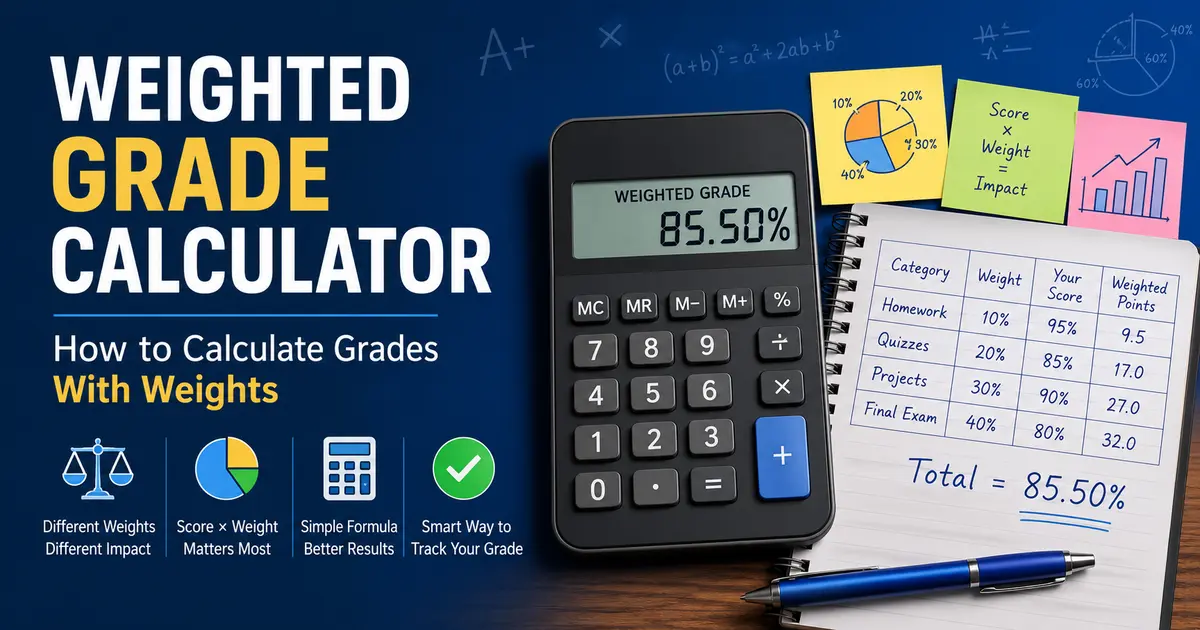
A weighted grade calculator helps you calculate your course grade when assignments, quizzes, exams, projects, and finals do not all count the same.
That is the part that trips students up. You may have a 90% on homework, an 80% on quizzes, and a 75% on exams, but your final grade is not always the simple average of those scores. If exams are worth 50% of the course and homework is only worth 10%, the exam score carries far more weight.
That is how weighted grades work. Every category has a value, and your final course grade depends on both your score and the weight of each category.
At StudentCalcTools, the goal is to make student math less painful. This guide explains how weighted grades work, the formula to calculate them, examples, edge cases, and common mistakes to avoid.
Key Takeaways
- A weighted grade gives different importance to different assignment categories.
- Your final grade depends on both your score and the percentage weight of each category.
- The basic formula is: score × weight, then add all weighted results.
- Your category weights should usually add up to 100%.
- A high score in a low-weight category may not help much.
- A low score in a high-weight category can heavily affect your final grade.
- If you need a faster answer, use the Grade Calculator after understanding the formula.
What Is a Weighted Grade?
A weighted grade is a course grade where different parts of the class count for different percentages.
For example, your class may be graded like this:
| Category | Weight |
|---|---|
| Homework | 10% |
| Quizzes | 20% |
| Projects | 30% |
| Final Exam | 40% |
| Total | 100% |
In this setup, the final exam matters more than homework. Even if you complete every homework assignment perfectly, homework only controls 10% of the final course grade.
That is why a grade calculator with weights is different from a basic average calculator. A basic average treats every score equally. A weighted average grade calculator treats each score based on how much it counts toward the course.
Weighted Grade vs Unweighted Grade
Before using a grade weight calculator, you need to understand the difference between weighted and unweighted grades.
| Type | How It Works | Example |
|---|---|---|
| Unweighted grade | Every score counts equally | Average of 80, 90, and 100 is 90 |
| Weighted grade | Each score or category has a different value | Exams may count 50%, homework may count 10% |
An unweighted grade calculator is useful when all assignments count the same. A weighted class grade calculator is needed when your teacher or professor uses categories such as tests, homework, labs, participation, projects, and finals.
Most weighted grading systems are based on weighted averages. In a weighted average, each value is multiplied by its assigned weight before the final average is calculated. Educational resources such as Carleton College’s SERC project explain weighted averages as a practical way students can calculate course grades and GPA-style outcomes.
Weighted Grade Formula
The weighted grade formula is:
Weighted Grade = (Score 1 × Weight 1) + (Score 2 × Weight 2) + (Score 3 × Weight 3) + …
If the weights are percentages, convert them into decimals first.
So:
| Weight | Decimal |
|---|---|
| 10% | 0.10 |
| 20% | 0.20 |
| 25% | 0.25 |
| 30% | 0.30 |
| 40% | 0.40 |
| 50% | 0.50 |
For example:
Homework Score × Homework Weight
If your homework score is 90% and homework is worth 10% of the course:
90 × 0.10 = 9
That means homework contributes 9 percentage points toward your final course grade.
Simple Weighted Grade Example
Let’s calculate a weighted grade using four categories.
| Category | Your Score | Weight | Weighted Points |
|---|---|---|---|
| Homework | 95% | 10% | 9.5 |
| Quizzes | 85% | 20% | 17 |
| Projects | 90% | 30% | 27 |
| Final Exam | 80% | 40% | 32 |
| Total | 100% | 85.5 |
Now add the weighted points:
9.5 + 17 + 27 + 32 = 85.5
Your weighted course grade is 85.5%.
Notice something important here. The student scored 95% on homework, but homework only helped by 9.5 points because it was worth 10% of the class. The final exam score was lower, but it affected the grade more because it was worth 40%.
That is the whole game with weighted grades. Weight matters.
How to Calculate Weighted Grades Step by Step
If you want to calculate your weighted grade manually, follow these steps.
Step 1: List Each Grade Category
Write down every category from your syllabus or gradebook.
Common categories include:
- Homework
- Quizzes
- Tests
- Midterm exam
- Final exam
- Projects
- Labs
- Participation
- Attendance
- Essays
Do not guess the categories. Use the official grading breakdown from your teacher, professor, syllabus, or learning platform.
Step 2: Find Your Average in Each Category
Next, find your score for each category.
For example:
| Category | Category Average |
|---|---|
| Homework | 92% |
| Quizzes | 84% |
| Exams | 78% |
| Final Project | 88% |
If your gradebook does not show category averages clearly, you may need to calculate them from individual assignments first.
Step 3: Convert Each Weight Into a Decimal
Turn each percentage weight into a decimal.
| Category | Weight | Decimal |
|---|---|---|
| Homework | 15% | 0.15 |
| Quizzes | 20% | 0.20 |
| Exams | 45% | 0.45 |
| Final Project | 20% | 0.20 |
Step 4: Multiply Each Score by Its Weight
Now multiply each category average by its decimal weight.
| Category | Score | Weight | Calculation | Weighted Points |
|---|---|---|---|---|
| Homework | 92% | 15% | 92 × 0.15 | 13.8 |
| Quizzes | 84% | 20% | 84 × 0.20 | 16.8 |
| Exams | 78% | 45% | 78 × 0.45 | 35.1 |
| Final Project | 88% | 20% | 88 × 0.20 | 17.6 |
Step 5: Add the Weighted Points
Now add everything:
13.8 + 16.8 + 35.1 + 17.6 = 83.3
Your weighted grade is 83.3%.
That is how a grade weighting calculator works behind the scenes.
Weighted Grade Example With Points and Weights
Some students have both points and weights in their course. This can be confusing because points and weights are not always the same thing.
Let’s say your course has this setup:
| Category | Points Earned | Points Possible | Category Average | Weight |
|---|---|---|---|---|
| Homework | 180 | 200 | 90% | 20% |
| Quizzes | 70 | 100 | 70% | 20% |
| Exams | 240 | 300 | 80% | 40% |
| Final Project | 95 | 100 | 95% | 20% |
First, calculate each category average:
Points Earned ÷ Points Possible × 100
Then multiply each category average by its weight:
| Category | Category Average | Weight | Weighted Points |
|---|---|---|---|
| Homework | 90% | 20% | 18 |
| Quizzes | 70% | 20% | 14 |
| Exams | 80% | 40% | 32 |
| Final Project | 95% | 20% | 19 |
| Total | 100% | 83 |
The final weighted grade is 83%.
This is where a grade calculator with weights and points helps. It keeps the two systems separate: points calculate the category score, while weights calculate how much that category affects the course grade.
What If the Weights Do Not Add Up to 100%?
In most classes, category weights should add up to 100%.
For example:
| Category | Weight |
|---|---|
| Homework | 20% |
| Quizzes | 20% |
| Exams | 40% |
| Final Exam | 20% |
| Total | 100% |
That is clean.
But sometimes students only have partial grades so far. Maybe your final exam has not happened yet, or your project grade is missing.
In that case, the visible weights may not add up to 100% yet.
Example:
| Completed Category | Weight |
|---|---|
| Homework | 20% |
| Quizzes | 20% |
| Exams | 40% |
| Current Total | 80% |
If only 80% of the course has been graded, you can calculate your current weighted grade based on completed work. But your final course grade will still change when the remaining 20% is added.
That is why you need to know whether you are calculating:
- Your current grade so far
- Your final course grade
- The score needed on a remaining assignment or final exam
Those are related, but they are not the same calculation.
What If One Category Is Missing?
A missing category can change the calculation depending on how your teacher handles ungraded work.
There are usually three possibilities:
| Situation | What It Means |
|---|---|
| Assignment is not graded yet | It may not count until entered |
| Assignment is missing and counted as zero | It can sharply lower your category average |
| Category has no grades yet | The weight may not affect your current grade yet |
This is why students often get confused when their grade suddenly drops after one test or final project. If that category has a large weight, one score can move the whole course grade fast.
For example, if exams are worth 50% of the class and your first exam score is 60%, your grade may fall even if you did well on homework.
Weighted grading is not always forgiving. It is math with a serious face.
Final Grade Calculator With Weights: When Do You Need It?
A final grade calculator with weights is useful when you already know your current weighted grade and want to know what score you need on the final exam.
That is a different question from calculating your current weighted grade.
Use a weighted grade calculator when you want to know:
- What is my current grade?
- How do my categories combine?
- How much do exams affect my grade?
- What is my weighted average right now?
Use a final weighted grade calculator when you want to know:
- What score do I need on my final?
- Can I still get an A or B?
- Can I still pass the class?
- How much can the final exam change my grade?
If you are trying to calculate the score needed on your final exam, use the final grade calculator after finding your current weighted grade.
Common Weighted Grade Mistakes
Weighted grades are easy to calculate once the setup is clear. The problem is that many students use the wrong inputs.
| Mistake | Why It Matters |
|---|---|
| Averaging all grades equally | This ignores category weights |
| Using points instead of percentages | Points and weights are different systems |
| Forgetting to convert weights into decimals | 20% should be 0.20 in the formula |
| Using incomplete gradebook data | Missing grades may change the result later |
| Assuming all categories are active | Some categories may not count yet |
| Ignoring zeroes | Missing assignments can damage category averages |
| Forgetting final exam weight | Finals often carry a large percentage |
| Mixing current grade with final grade | Current grade and final course grade are not always the same |
The biggest mistake is treating a weighted class like a normal average. That can make your grade estimate look much better or much worse than reality.
Weighted Grade Calculator vs Grade Calculator
The terms can overlap, so let’s make this clear.
| Tool Type | What It Helps With |
|---|---|
| Weighted grade calculator | Calculates grades when categories have different weights |
| Grade calculator with weights | Same idea, often used for current course grade |
| Grade weight calculator | Helps apply category weights to scores |
| Weighted average grade calculator | Calculates the weighted average of multiple grades |
| Course grade calculator with weights | Estimates your overall course grade |
| Final weighted grade calculator | Helps estimate final outcomes when final exams or remaining work are included |
The grade calculator can help you calculate your course grade using scores and weights, especially when your class does not use a simple average.
How Weighted Grades Affect GPA Planning
Weighted course grades can also affect your GPA planning.
For example, suppose you are trying to keep a B in a 4-credit class. If the final exam is heavily weighted, your final score could move the course grade enough to affect your term GPA.
After you estimate your weighted course grade, you can use a GPA calculator to see how that course may affect your GPA.
This is especially useful for:
- College students
- Scholarship requirements
- Academic probation concerns
- Major course requirements
- Honors eligibility
- Student athletes with grade requirements
Many university GPA tools also warn that GPA calculations are estimates and depend on accurate inputs. For example, Purdue University’s Academic Success Center describes GPA calculators as planning tools and notes that advisors can provide more specific guidance.
How to Check If Your Weighted Grade Is Accurate
Before trusting your result, check these items:
| Question | Why It Matters |
|---|---|
| Do the weights add up to 100%? | If not, you may be missing a category |
| Are all grades entered? | Missing scores can change the result |
| Are zeroes included? | A missing assignment counted as zero can hurt badly |
| Are you using category averages? | Individual scores may not be enough |
| Are weights from the syllabus? | The syllabus is usually the official source |
| Does your teacher round grades? | Rounding can change borderline results |
| Is the final exam included? | Finals often carry high weight |
If something looks off, check the syllabus before assuming the calculator is wrong. Most grade confusion comes from bad inputs, not bad math.
Quick Weighted Grade Practice Example
Try this one.
| Category | Score | Weight |
|---|---|---|
| Homework | 100% | 10% |
| Quizzes | 80% | 20% |
| Tests | 75% | 40% |
| Final Exam | 90% | 30% |
Now calculate:
100 × 0.10 = 10
80 × 0.20 = 16
75 × 0.40 = 30
90 × 0.30 = 27
Add them:
10 + 16 + 30 + 27 = 83
The weighted grade is 83%.
Notice that the 100% homework score helped, but it did not dominate the result because homework was only worth 10%. The 75% test score mattered more because tests were worth 40%.
That is weighted grading in one clean example.
When You Should Use a Calculator Instead of Manual Math
Manual math is useful because it helps you understand what is happening. But a calculator is better when:
- You have many assignments
- Your class has multiple weighted categories
- Your gradebook uses points and weights
- You want to test different score scenarios
- You are close to a grade cutoff
- You need to avoid decimal mistakes
- You want a fast estimate before finals
A grade weighted calculator is not there to replace understanding. It is there to save time and reduce errors.
Final Thoughts
Weighted grades look confusing at first, but the idea is simple: every score matters according to its weight.
The formula is:
Weighted Grade = (Score 1 × Weight 1) + (Score 2 × Weight 2) + (Score 3 × Weight 3) + …
If your weights add up to 100%, each category contributes its share to your final course grade.
So if homework is worth 10%, it can only do 10% worth of damage or help. If exams are worth 50%, they are the heavy hitters. No mystery there.
Use the formula when you want to understand the math. Use the grade calculator when you want a faster answer with fewer mistakes.
FAQs
What is a weighted grade calculator?
A weighted grade calculator is a tool that calculates your course grade when different assignments or categories count for different percentages of the final grade.
How do I calculate a weighted grade?
Multiply each score by its weight, then add the results together. For example, if homework is 90% and worth 20%, it contributes 18 points to your final grade.
What is the weighted grade formula?
The formula is: Weighted Grade = (Score 1 × Weight 1) + (Score 2 × Weight 2) + (Score 3 × Weight 3) + more categories as needed.
What is the difference between weighted and unweighted grades?
An unweighted grade treats all scores equally. A weighted grade gives different importance to different categories, such as homework, quizzes, tests, projects, and final exams.
Should grade weights add up to 100%?
In most classes, yes. The total category weights should usually equal 100%. If they do not, check whether some categories are missing, ungraded, or not active yet.
What is a grade calculator with weights?
A grade calculator with weights helps calculate your course grade when each category has a percentage value, such as homework worth 20%, tests worth 40%, and finals worth 30%.
Can I calculate weighted grades with points?
Yes. First calculate the percentage for each category using points earned divided by points possible. Then multiply each category percentage by its weight.
What if my final exam has a weight?
Include the final exam as one of the weighted categories if you already know your final exam score. If you are trying to find the score you need on the final, use a final grade calculator instead.
Why is my weighted grade lower than my average?
Your weighted grade may be lower if you scored poorly in a high-weight category. For example, a low exam score can pull your grade down even if your homework scores are high.
Can a weighted grade affect my GPA?
Yes. Your final course grade can affect your GPA, especially if the course has multiple credit hours. After estimating your course grade, use a GPA calculator to estimate GPA impact.